4 Hilarious sales videos to make your sales team laugh
Being a sales rep is hard work, there’s no doubt there. To avoid burning out from this job or being too serious all the time, you need to find time to laugh, and nothing’s better than laughing as a team. Humor is the best way to connect with your team, develop a friendship, and have something in common. Here are 4 hilarious sales videos that you should share with your team to get them laughing.
Sales Therapy- try SalesMesh from AppMesh
Sales reps and CRM have been married for a couple decades now. What would it be like if they got the chance to talk things out?
A Conference Call in Real Life
No one likes conference calls, but what if they happened in real life? Our guess is you’d hate them even more.
Monster Tips: Nailing the handshake
A handshake is the first physical interaction you’ll have with a recruiter, customer, fellow sales rep, or hiring manager so you’ve got to nail it.
‘OUR PRICES HAVE NEVER BEEN LOWER!’- The Office US
Okay so maybe this isn’t the best example of how to make a sales call but you can’t say it’s not funny.
The 9 Most Influential Salespeople and How They Can Inspire You
Are you feeling a slump in sales right now? The best way to energize your sales block is by reading people’s success stories. It’s impossible to choose one overall best salesperson in the entire world, so we’ll settle for having several. There are many more where this list came from, but here are 9 of the most influential salesmen and women that you’ve heard of, read about, and possibly even met.
#1 Sam Taggart
A common name in the door to door world, Sam Taggart is an inspiration and teacher to every rep and company in sales. He’s a door knocker, consultant, and author to the door to door sales population. With his forming of the D2D Association and the D2D Experts, Taggart is a household name to anyone involved in sales.
He has made and continues to make countless informative sales videos and has helped sales reps all over the world. There’s no doubt that this sales expert is and will continue to be one of the best salespeople in the world.
#2 Napoleon Barragan
Napoleon Barragan is the perfect example of a salesperson who started small and went big. Born in Ecuador, Barragan began his sales career selling soda pop and beer from a donkey in Colombia during the 1950s. After immigrating to the United States, Barragan led the way in e-commerce with online sales of mattresses in the earliest days of the internet. He started 1-800-Mattress and over time he grew his company into a $170-million-a-year business. Barragan is proof that no matter where you start out, you can become a successful salesperson if you have enough grit and determination to get through the low points.
#3 Joe Girard
Joseph Samuel Girardi was a classic American salesman. He was most talented in selling cars. Girard sold 13,001 cars at a Chevrolet dealership between 1963 and 1978 and was recognized by the Guinness Book of World Records as the seller of the most cars in a year. Now with his own empire of motivational and inspirational guest speeches, Girard has made selling his life. Even if cars aren’t your product, you can still use his life as a lesson. Girard gave everything he had to break records and to become successful.
#4 Zig Ziglar
Many are familiar with the inspirational words of American author, salesman, and motivational speaker Zig Ziglar. For those of you who aren’t familiar with Mr. Ziglar, he made millions in sales and sales training throughout his lifetime. He has also published self-help books on the topic of sales, recording educational videos, and inspired many to up their sales game. Although Mr. Ziglar has passed away, his sales techniques and inspirational words live on.
“A prospect’s nonverbal expressions are often more powerful than words. Fifty-five percent of the prospect’s feelings and attitude are communicated via body language.”
#5 Erica Feidner
Although women are not the majority of the sales profession, there are still women regarded as “Sales Gods” and one of them is Erica Feidner. As a representative for Steinway & Sons Pianos for 8 years, Feidner sold over $41 million dollars in pianos, more than anyone else in her time. This talent for sales earned her nicknames like “The Piano Matchmaker” or “The Lady that Sold $41 Million in Steinways.” She took pride in making sure that she explained exactly what the client needed to know and how to help them understand her product. This is a strong lesson, if your client is confused about your services or what choice is right for them, then you haven’t done your job as a sales rep yet.
“If you cannot tell the difference and thus know which piano is right for you, I haven’t yet succeeded.”
#6 Jordan Belfort aka “The Wolf of Wall Street”
Another big player in the D2D world is entrepreneur Jordan Belfort, or more commonly known as the Wolf of Wall Street. Having a movie created to tell his life story is only part of what makes him one of the most influential salespeople ever. Belfort also has popular social media platforms like YouTube and Podcasts to help educate his listeners on his sales experiences and advice.
#7 Mary Kay Ash
Another pioneer for women in business was Mary Kay Ash. She made her beginning selling Stanley Home Products to everyday people in hosting parties. Working from her humble beginnings, Ash was eventually known for creating a cosmetics empire: Mary Kay. Although she didn’t have much to begin with and she isn’t your conventional salesperson, Ash has created a company that produces over $3 billion a year in sales with over 5,000 employees.
#8 John H. Patterson
Traveling back further in time, we come to John H. Patterson, known as the “Father of Sales and Innovation.” Patterson was the first person to create a system for value. He gained control of the failing National Manufacturing Company, creator of the cash register, and turned their product into something everyone wanted and should have for their business. Before Patterson, people didn’t see the value in having a cash register, but he had the vision to make it a sought-after and necessary product for every business in the 1800s to modern day.
#9 Ron Popeil
The American inventor and marketing personality, Ron Popeil, made a modest start in the world. He was born to a big family and didn’t have much, but his sales-like personality and inventive nature helped him create an empire known as Ronco. Along with his success in inventions and marketing, he began the infomercial craze and coined the phrase: “But wait, there’s more!” (now we know who to blame when that gets stuck in your head). However he wasn’t just known for inventing products and making catchy phrases, he also published sales books detailing the framework for his success and what made him the “Salesman of the Century.” His success has since taken off and created a name worth roughly $200 million dollars still to this day.
It’s Your Turn
What’s stopping your name from being on that list? These salespeople were not born famous, they worked hard for their prestige. There’s a lesson in every one of these stories that has a different but equally important lesson on how to become the best version of yourself in sales.
Now you can plan your sales routes the best way possible
Turn-by-turn directions on iOS is now available through Apple Maps, Google Maps, and Waze. Previously our app did everything to plan your sales route besides the actual navigation to get there. We’ve recognized that need and have updated our app to include a turn-by-turn full navigation to make sure you choose the fastest and most efficient route possible to get through your sales.
Take a Look
With the new turn-by-turn directions, this is what you’ll see in your sales app. You now have the option to select this in-depth navigation to guide you through your list of leads. With this feature you will be able to choose the fastest route through your leads list, saving you a lot of time on your daily knocking routes.
Once your preferred navigation software is selected, you’ll be be able to select the houses you need to visit, which will create an entire map for you from start to finish formatted like the images below. If you’re not familiar with our app, download it now in the Google Play or Apple app store and start trying it out now.
Get This Feature Now
Download our complete outside sales app to get access to new features like this one. Planning and executing a sales route has never been easier on reps and managers. If you don’t have our app yet, schedule a free demo to talk to one of our talented team members.
10 Steps to Create a Successful Sales Plan
Sean Huckstep
Learn how to create a successful sales plan with 10 easy steps
Having a sales plan is a crucial part of business. Having unexpected times like these are specifically why a sales plan is necessary. A sales plan shared throughout the necessary teams will do a lot to keep their motivation up and goals aligned with everyone in the company. If you haven’t developed a plan already, now is the time to get started.
What is a Sales Plan and Why is it so Important?
A sales plan lays out your objectives, high-level tactics, target audience, and potential obstacles for your company. It’s like a traditional business plan but focuses specifically on your sales strategy as a whole. Having a business plan is a great way to lay out your goals, but a sales plan describes exactly how you’ll make those goals a reality. Sales plans often include information about the business’ target customers, revenue goals, team structure, and the strategies and resources necessary for achieving its set targets. If you’re wondering what a sales plan is and why it’s necessary to the growth of your company, consider these benefits and practices.
An effective sales plan should do the following for your team:
Communicate your company’s overall goals and ambitions with everyone.
Provide strategic direction for your sales teams day to day and future plans.
Outline and detail all the roles and responsibilities for your sales team and leadership groups.
Monitor your sales team’s progress towards your set goals.
When considering your sales plan, keep in mind that it will be the driving force and measure of your team’s productivity and organization. A good plan will keep your team motivated and strong despite unforeseen changes in the sales industry like COVID-19.
Establish Your Company Mission and Background. The best way to begin your sales plan is by writing down your vision and mission statement for company success. This will provide background information to guide the rest of your sales plan decisions.
Decide on a Target Market. Even if you’ve already written down facts about your target market, revisit it and make sure it’s accurate. It doesn’t matter how many times you’ve written out a description of your key demographic because it can always change. Ask the following questions when considering this: What does your best customer look like? What struggles does this customer face? Do they belong to a specific industry? etc.
Make a Prospecting Strategy. Before your reps plan their routes, create a checklist of criteria to find a qualified buyer. Doing this pre-screening makes sure your reps don’t waste their time on unqualified buyers.
List Everyone on Your Team. Write down the names and roles of your team members. This is a great way to keep your current team organized and helps you recognize what gaps in roles you might have.
Tools, Software, and Resources. Include a detailed list and description of all the CRM softwares, tools, training, and documentation you’ll need to run your business smoothly. If you find gaps in your resources, also include a list of what you plan to use in the future. Making a list of priced resources will also help you in the budgeting step of your sales plan.
Name your competitors. Don’t be afraid to create a list of your competitors and figure out what they’re doing that you’re not. Explain how your products compare, where theirs are stronger than yours, and vice versa. In addition, discuss their pricing versus yours to give your potential clients all the information they need to pick your company for their services.
Develop an entire Marketing Strategy. Marketing includes: pricing, paid partnerships, promotions you plan on implementing, and what key actions need to be taken to increase your brand awareness. Having solid marketing will result in clearer online visibility and more lead generation. Having sales and marketing strategies on the same page will ensure that the success of your company is amplified and well-known.
Outline an Action Plan With Goals. Once you have identified your specific company objectives to work towards, you need to create an action plan to actually accomplish those set objectives. But don’t overcomplicate it. Creating a simplified action plan will make those objectives much more manageable. Your goals should be based on what you’ve already accomplished and how much you can and expect your team to progress from that knowledge.
Create a Budget. Consider the following when making your plan: salaries, sales training, sales tools and resources, team bonding activities, travel costs, electronic expenses, swag cost.
Include the Entire Team. Even if a portion of your sales plan does not involve an employee, involve them anyway. Sales plans are far more likely to succeed when they’re implemented by the entire staff. Having transparent workflows of how the company operates will also give them a better understanding of what it takes to keep a company afloat.
Create a Sales Plan Now
If you don’t have a sales plan yet, start today. Having a solid sales plan not only boosts the productivity of your company, it also keeps your team on the same page no matter where they are. Get started with a basic sales plan template now and adjust it to the wants and needs of your specific team as you grow.
What tips do you have from your successful sales plan?
4 Communication Styles in Remote Work
Diana May-Jennings
Identifying and managing different communication styles
It’s common knowledge that not everyone communicates the same way. There are benefits to having a variety of communication styles, but there can also be negatives. If you’re struggling with a coworker or boss that has a different communication style than you, knowing and understanding what they respond well to will help you improve that workplace relationship. Having strong communication is necessary to a healthy work environment. If you feel like you’re struggling to figure out someone you’re interacting with, keep reading to figure out which communication style you and your coworkers have, and how you can learn to better tailor your communication for one another.
Why Communicate?
With the continuation of remote work, communication has become absolutely necessary. In order for remote work to be successful, teams need to learn how to communicate based on the personality of the people in the company. It’s not a one-size-fits-all approach, people respond positively and negatively to different styles of communication. If you don’t know what type of communication styles you’re dealing with, learn about these 4 basic ones and how you can identify communication styles from now on. There’s no such thing as over communication at a time like this, so it’s time to learn what different communication styles you will deal with now or in the future.
Passive communicators struggle with expressing themselves. They hope to avoid conflict at all times but they nonetheless hold tight to their convictions. Signs of a passive communicator is: silence in conflict, someone who makes a statement and immediately changes it based on the reactions of others.
The best way to manage someone that is passive is to communicate with them one-on-one. They will not be honest with you about their feelings in a group setting so give them a chance to email you or to talk only with you. Make them feel safe in your work environment.
Strengths:
Not overbearing to the opinions of others.
Allows others to express themselves.
Is kind and thoughtful in communication approach.
Weaknesses:
Fear of communicating in a group.
At times, cannot adequately express professional opinion.
On the other side of the spectrum are the aggressive communicators. These are the coworkers that have no problem calling you out in a meeting or voicing their opinion without being asked. There is value in being more aggressive than passive, but it is not the ideal communication style. If you likely dread communicating with someone, they are more likely than not an aggressive communicator.
Dealing with an aggressive communicator can be difficult, but if you establish and enforce boundaries with them, they are more likely to respect you and follow your boundaries. Give them the ability to vent (because everyone needs that nowadays) without them directing it at you.
Passive-aggressive communicators are not as straightforward as aggressive communicators, but rather they find ways to hint at their displeasure with others. They often are nice to some and less friendly to others. Like passive communicators, passive-aggressive people will likely avoid any workplace conflict when they can help it and if they have conflict they will vent to someone they’re close to instead of handling the issue head-on.
When you’ve identified someone that is a passive-aggressive communicator, you need to keep your cool with them. Because they avoid conflict, they try to get others to express their anger or frustration for them. Another habit you should form with a passive-aggressive person is to redirect their frustration to the real problem and encourage them to be more assertive about what is bothering them with the person they are bothered about.
Now that we’ve seen the problems associated with being passive, passive-aggressive, and aggressive, let’s take a look at an ideal communication style: assertive. An assertive communicator addresses problems directly and expresses themselves and their boundaries while maintaining respect for others.
This is the most ideal form of communication in any setting, but especially the workplace. Signs you’re dealing with an assertive communicator is if they address an issue that bothers them immediately, if they actively listen to others and address their problems in a constructive way, and if they are clear and direct about their expectations.
Strengths:
Clear and confident.
Listens to others.
Immediately handles uncomfortable situations.
Weaknesses:
At times, they try too hard to quickly fix a situation.
Communication with Hybrid Teams
Having some workers function remotely while others are holding down the office fort can make communication extra challenging. But having a hybrid team is the precise reason why you should learn about the four most common communication styles and then identify which members of your team have these styles. It can seem like a daunting task, but if you take it one person at a time, you’ll be surprised at how much you can learn about your coworkers and employees.
Which communication style best describes you?
Learn About Datagrid and How to Use It
Brady Anderson
Implement DataGrid to sort out the fluff and target your ideal prospects.
For too long canvassing has been a shot in the dark at door after door, but a new era of marketing intelligence is here. No more wasting time with unqualified prospects, now you can target your ideal customer. Do you prefer owners to renters? Do you perform strongly with new buyers? Our DataGrid displays over 30 different data points to help you target your market sweet spot. Go through the list, build your ideal prospect, and then ignore everyone else by using Datagrid.
What is DataGrid?
DataGrid is a map overlay that gives you dozens of crucial data points on homes in an assigned area. It’s the best tool for generating leads and maximizing canvassing efforts.
What defines your ideal buyer? Income? Homeowner status? Credit score? Whatever your needs, DataGrid allows you to target high propensity buyers by giving you actionable information for every home.
Best Practice Tips
Go through the list of data points and be selective on the data points displayed for your reps
Make sure they focus on the points that will leverage effectiveness and quickness of a sale.
Do not exceed 3 Areas per rep
This will save battery for your rep’s device.
Create focus and intent on the Areas reps should be working.
Allow reps to have backup Areas to work if they blaze through their assignment.
This allows DataGrid to sync faster.
Do not exceed 3K homes within Areas
3K is the absolute max of homes we will sync to any one given Area
If you have multiple reps assigned to one Area, make sure everyone turns on Shared Leads via their device filters
Control the demographic information in the web app DataGrid Settings so your reps see certain information before knocking a new door. Knowing before you knock will give your reps a huge upper hand when it comes to landing a potential prospect.
This feature is only available to companies that have added the DataGrid package to their billing plan. If you would like to add this to your plan, please contact our Support at (801) 418-9009.
Get Set Up Now
If you haven’t had the chance to learn more about DataGrid or view a demo, visit here to get started. No need to keep wasting your time with subpar prospects. DataGrid gives you reliable sales intelligence and homeowner information, so you can go exactly where the deals are.
New and Improved Personal Dashboards
Diana May-Jennings
New iOS and Android Mobile Dashboards
We’ve been working hard to create a more engaging experience for you on our mobile app. The latest results of that effort are these new dashboard updates for iOS and Android which clean up the user experience and help you work more efficiently.
iOS Update
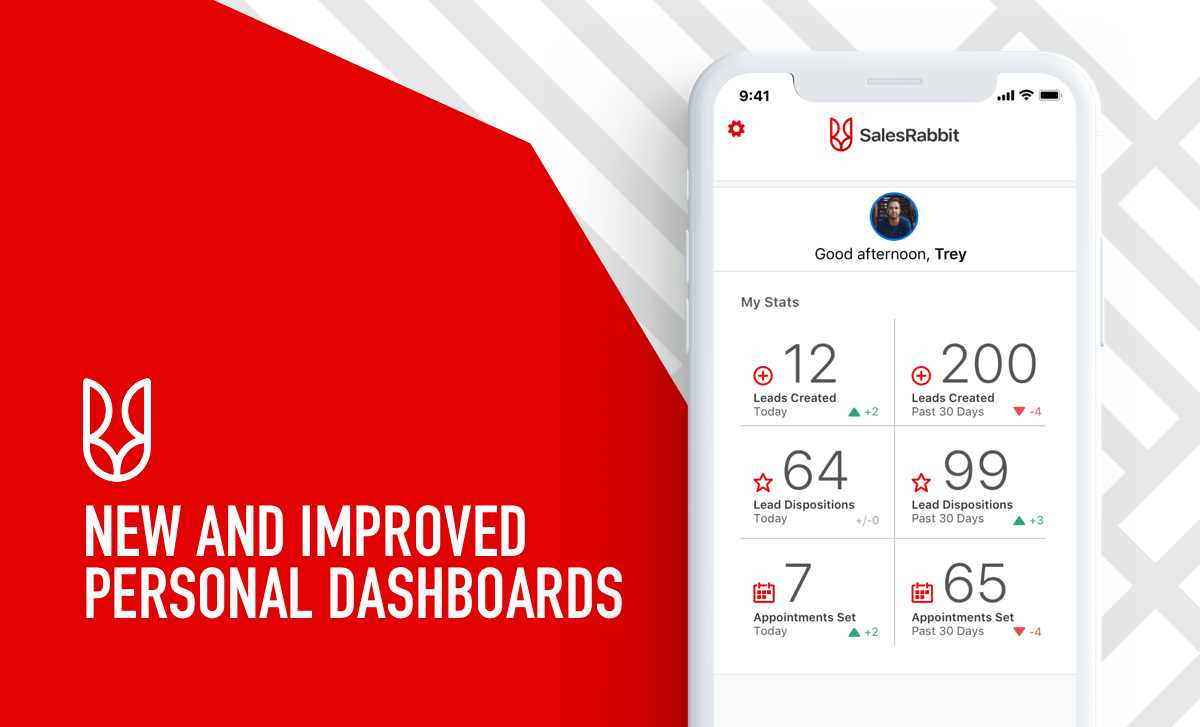
Instead of searching to find the number of leads you’ve created and appointment you have, we’ve made a convenient and intuitive personal dashboard that gives that information to you immediately.
As you can see, with this new dashboard you can see your number of leads created for the day and then your total number of leads for the last 30 days. The entire column on the right gives you stats based on a revolving 30 day period.
The left column provides information relevant to that day. All of these stats make it extremely easy to see several stats: your daily leads, how many leads you have dispositioned, and the number of appointments you have that day as well as the last 30 days.
Android Overhaul
Until now, our Android mobile app didn’t have a landing page. Now, we’ve matched Android to have a robust personal dashboard as well.
You can see here that this dashboard shows all the same stats as the iOS dashboard above. You’re able to quickly access your number of leads created and dispositioned for that day as well as your scheduled appointments.
To show you a broader scope of your productivity, Android also has the revolving 30 day feature for your rep stats. Having these stats available quickly helps you to know your current numbers and aim for past numbers to beat.
Future Updates
Our updates won’t stop here. We plan to continue improving our mobile app for your convenience and efficiency. In the future we’ll make it easier for you to access your calendar in the app and toggle between appointments to quickly get the details.
This is just one of the updates that’s yet to come to make this mobile app even more friendly to your sales experience. If you’re not already a SalesRabbit user, you’re missing out. Try a free demo now to get in on the best version of our app so far.
Creating a Safe Contacting Campaign
Diana May-Jennings
Reach your target audience without leaving the house
We understand that many companies are not able to visit their target audience right now. But that doesn’t mean business has to stop. In order to keep your marketing up— while still staying safe— you can easily create an email or mail campaign. Either is a great option to contact your leads consistently so your sales funnel doesn’t take a hit. Here are some tips and tricks on how to create an effective contacting campaign from home.
Email Campaigns
Because of COVID-19 most, if not all, sales companies have shut down their door to door operations. This can lead to a major loss of contact with your potential customers, making it hard to build or maintain a relationship with any leads. Here’s how to get an intuitive email campaign going with our integrated service MailChimp, who will help you keep in contact with your leads:
Pick a template or design that represents the personality of your company.
Add your best content to draw people into the message. Be relatable, informative, helpful, and succinct.
Automate the process to make mass emails easy. Using lead information from SalesRabbit you can import the information you already have into an automated system.
Track the responses and watch as people engage with your company.
Still wondering if you should try an email campaign? Turns out email marketing campaigns are 40% more effective than social media. Don’t underestimate how much it could do for your company.
Mailing Campaigns
If email campaigns aren’t your thing, there are still ways to avoid losing all the hard work you’ve put in to get your leads. Try implementing a mailing campaign. A mailing campaign can be done with postcards, letters, ads, the choice is endless.
Here are basic principles to creating an effective mailing campaign:
Create a list of all the contacts you want to reach out to.
Make an inviting and intriguing message with an offer, call to action, and contact information for your company.
Have a consistent design. Your mail should match your company’s color, logos, and copy.
Additionally, through an integration with MailChimp, a marketing platform for creating mailing campaigns, you can export lead lists from our app into their software. It’s an easy way to use lead information you already have to create mailing lists and automate how often your leads are sent mail. This allows you to contact your potential or even existing leads without leaving your house.
Try it Now
Get started on your email or mailing campaign to keep your company viable in these trying times. Using these tips you can follow the rules of quarantine while still helping promote your business.
SalesRabbit Tips – Custom Fields
Sean Huckstep
Collect better lead data and close more deals with Custom Fields.
One of the primary ways SalesRabbit improves sales processes is by helping users collect accurate lead information. The more a sales team knows about their leads, the more effectively they can move them through the pipeline. Pretty straightforward.
Track Industry-Specific Data
But a lot of industries and companies have unique data points that they need to track in order to be as efficient as possible. Oftentimes a generic lead status (not home, interested, appointment, etc.) doesn’t communicate enough lead information to be helpful. Most teams require more specific consumer data in order to be strategic.
For example, picture Client A, who is interested in your product but has terrible credit. If the only thing you knew about Client A is that he was interested, of course you’re going to dedicate resources to reaching out to him. Unfortunately, you eventually realize that he doesn’t qualify for your product/service and probably won’t for a while.
But if you ask your reps or canvassers to collect credit score estimates from your clients early in the sales process, you’d know much earlier that Client A is unqualified, despite his interest. You can then spend your resources with clients who are worth the effort.
You Control the Info
Our custom forms make it possible for every company to collect whatever information they need. We’ve seen a wide range of tracked data points, but common ones include soft credit score, current utilities provider, roof size/pitch, renter/owner status, etc.
If none of those things are important, don’t worry. You’re in control of the information you collect, and in this video, our product expert Karlie shows you how easy it is to set up:
And here you can see what that looks like in the app once it’s set up:
As you can see, we’ve built enough field types— text, number, currency, dropdown, etc.— that you should have no problem collecting the information you need in the field. This data is also available to import/export so that you can populate all your different software solutions and databases with the same information.
You probably know best what information is important to your teams. But if you’re not sure, we’ve got plenty of experience helping clients build custom forms that improve their sales process and ultimately increase their sales numbers. We’re happy to help you build a better system by collecting smarter data.
Get Started Today
The most important thing is to get started. Custom forms are a great way to encourage better selling habits from reps, because you’re forcing them to be more inquisitive and have better conversations with prospects. A big part of becoming a master salesperson is learning to ask the right questions, and custom forms give you more control over the type of questions your teams are asking and the information they’re gathering. If you’re not getting the data, you know your reps aren’t asking the questions. It’s a great way to monitor and encourage rep selling behavior.
If you’re already using SalesRabbit, head to the web app and start building a couple custom form questions and see how that improves things for your teams. If you’re not a user yet, feel free to reach out and see what this and other features can do to drive higher sales numbers for your teams.
Door-to-Door Canvassing Strategies
Sean Huckstep
Strategies for Effectively Canvassing an Area
Sales is about being fast paced and making the most out of selling hours. When you intelligently canvass a neighborhood, you not only make the most of your time, but you also establish trust within the area and land more sales as a result. Lead sales trainer, Ryan Roche, teaches you how to canvass smarter with these 2 simple steps.
Collect Lots of Intel
The better you know an area, the more likely you’ll be successful selling there. Any time you are able to sit down with a lead, get to know as much information about them, the area, and the neighbors as you can, your sales will benefit. With our app you’ll already learn a lot about the customer, but dig deeper and get more personal by asking questions like:
Do you know about how many families are in the area?
Who gets home, when?
Who is tech savvy in your family?
Have there been recent break-ins in the neighborhood?
Do you hear about problems with spiders, bugs, etc in the area?
Even if the prospect is not your ideal customer, they can still be a valuable resource to easily collect data about the area. Getting general information about a neighborhood, as well as industry specific information—learning about break-ins or pest problems—will set you apart from other reps. The more you know about your surroundings, the better you’ll sell.
Look For Any Signs of Life
Rather than going house-to-house hoping that people are home, look for what Roche refers to as “Signs of Life.” If there are cars missing, lights off, visible oil spills in the driveway, there is most likely no one home. There’s still a slight chance that someone’s there, but you want to play to your odds. It’s most effective to knock until 4 or 5 pm (skipping the houses that show no signs of life) and as most people return home from work at 5 pm, circle back around to the houses that were previously vacant.
This is what Roche calls the “Yo-Yo Approach” to knocking. After time has passed and people are home to chat with, it’s important to go back to the houses you skipped. This is how you make the most of an area. Most reps usually skip going back to missed houses, but by doing a yo-yo approach, you’ll be set apart from the competition because you cared enough to speak to every person. Having commitment and attention to detail with an area builds trust and recognition with your leads that’ll turn into referrals or future sales.
How to Keep Learning
If you liked what you learned from this video, we have plenty more for you. Visit our SalesRabbit Learn program that gives you a playbook of resources and training for reps and management. You can use our training videos, but why stop there? Upload your own learning content or rely on the great content library we’ve already built. Once you have your training materials, you can assign videos for reps as homework and track their progress through the training. Using our program will introduce premium content that’ll impact the future of your success.


 Diana May-Jennings





 Brady Anderson


 Sean Huckstep





You must be logged in to post a comment.